Amazon ALEXA Lists Exercise – Put’em on Paper…
4. Solution Components
Let’s look at each of the components in detail. You may want to create the items in the same order as we did here, particularly with the ALEXA stuff.
4.1 Amazon AWS Lambda glue code
To understand the code, you’d have to make yourself familiar with the following resources:
- ALEXA request and response JSON reference: the request object is passed in python lambda_handler’s „event“ variable, ALEXA custom skills expect the generated response object as python dictionary return ed.
- ALEXA shopping and to-do lists REST API documentation: this page describes REST methods to read and manipulate both the built-in shopping list and the to-do list of an Amazon Account.
And yes, we’re using plain old python spaghetti code (POPSCTM) – no Flask-Ask or similar. After all, this is supposed to be an excercise…
4.1.1 Source Code
from urllib.request import *
from urllib.error import HTTPError
from urllib.parse import urlencode, quote_plus, quote
import json, sys, ssl, socket


def lambda_handler(event, context):
    # ******************************
    # *** Do we have a valid event?
    # ******************************
    if not "request" in event:
        # wrong event passed or not a dict.
        return { 'version': '1.0', 'response': { 'outputSpeech': { 'type': 'PlainText', 'text': "Sorry, I didn't get your request." } }, "shouldEndSession": True }
    if event["request"].get("type", '')!='IntentRequest' and event["request"].get("type", '')!='LaunchRequest':
        # we don't have an intent here
        return { 'version': '1.0', 'response': { 'outputSpeech': { 'type': 'PlainText', 'text': "Sorry, I didn't get your request." } }, "shouldEndSession": True }

    # ******************************
    # *** Do we have a consent-token? If not->user must approve in APP
    # ******************************
    if not "context" in event:
        # This should not happen
        return { 'version': '1.0', 'response': { 'outputSpeech': { 'type': 'PlainText', 'text': "Sorry, I didn't get your request." } }, "shouldEndSession": True }
    apiEndPoint    = event["context"].get("System", {}).get("apiEndpoint", "")
    apiAccessToken = event["context"].get("System", {}).get("apiAccessToken", "")
    if apiEndPoint=="" or apiAccessToken=="":
        # User must grant access to this skill in their Alexa App
        return { 'version': '1.0', 'response': { 'outputSpeech': { 'type': 'PlainText', 'text': "Please open your ALEXA app and grant both read and write access on your lists to this skill." } }, "shouldEndSession": True }

    # Determine which one of the two lists the user wanted to print, default=shopping list
    liste = "shopping list"
    # this is intended for the German voice interface, obviously a Q&D hack; you'd need to work with IDs to make it language independent
    if event["request"].get("intent",{}).get("slots",{}).get("listName",{}).get("value",'')=='aufgabenliste' or event["request"].get("intent",{}).get("slots",{}).get("listName",{}).get("value",'')=='aufgabenzettel':
        # ok, it's the TODO list
        liste = "todo list"

    # ******************************
    # **** TRY TO LOAD ALEXA LISTS
    # ******************************
    try:
        req  = Request(apiEndPoint+"/v2/householdlists/", data=None, headers={"Authorization": "Bearer "+apiAccessToken, "Content-Type": "json"}, method="GET")
        resp = urlopen(req)
        alexaListsJson = resp.read()
    except:
        # nah, alexa has a bad day today.
        return { 'version': '1.0', 'response': { 'outputSpeech': { 'type': 'PlainText', 'text': "Sorry, I could not access your lists." } }, "shouldEndSession": True }

    # ******************************
    # **** TRY TO DECODE ALEXA LISTS
    # ******************************
    try:
        alexaListsDict = json.loads(alexaListsJson)
    except:
        # nah, alexa has a bad day today.
        return { 'version': '1.0', 'response': { 'outputSpeech': { 'type': 'PlainText', 'text': "Sorry, I received an unexpected list format." } }, "shouldEndSession": True }

    # ******************************
    # *** Fetch list item arguments
    # ******************************
    for currentList in alexaListsDict["lists"]:
        listState = currentList["state"]
        listName  = currentList["name"]
        listId    = currentList["listId"]
        listUrl   = ""
        # get 'active' list URL
        for listUrls in currentList["statusMap"]:
            if listUrls["status"]=="active":
                listUrl = listUrls.get("href", "")
                break
        if liste=="shopping list" and listName == "Alexa shopping list":
            break;
        if liste=="todo list" and listName == "Alexa to-do list":
            break;
    if listUrl=="":
		    # Shoot, we don't have a URL for the selected list
        return { 'version': '1.0', 'response': { 'outputSpeech': { 'type': 'PlainText', 'text': "Sorry, I received an unexpected list format." } }, "shouldEndSession": True }
    # ok, we now have the correct URL for the particular list
    listUrl = apiEndPoint + listUrl

    # ******************************
    # *** Fetch list items arguments
    # ******************************
    try:
        req  = Request(listUrl, data=None, headers={"Authorization": "Bearer "+apiAccessToken, "Content-Type": "json"}, method="GET")
        resp = urlopen(req)
        alexaListItemsJson = resp.read()
    except:
        # We could not retrieve the list's items
        return { 'version': '1.0', 'response': { 'outputSpeech': { 'type': 'PlainText', 'text': "Sorry, I could not retrieve your "+liste+"." } }, "shouldEndSession": True }
    try:
        alexaListItemsDict = json.loads(alexaListItemsJson)
    except:
        # item payload has an unexpected format
        return { 'version': '1.0', 'response': { 'outputSpeech': { 'type': 'PlainText', 'text': "Sorry, your "+liste+" has an unexpected format." } }, "shouldEndSession": True }
    alexaListItemsList = []
    for listItem in alexaListItemsDict["items"]:
        if listItem.get("value",'')=="": continue
        alexaListItemsList.append(listItem.get("value",''))
    if len(alexaListItemsList) == 0:
        return { 'version': '1.0', 'response': { 'outputSpeech': { 'type': 'PlainText', 'text': "Sorry, your "+liste+" is empty." } }, "shouldEndSession": True }

    # ******************************
    # *** Print the list items
    # ******************************
    secret = "1234567890__REPLACE__WITH__YOUR__SECRET__1234567890" # obviously, URL-compatible characters only. Or url-encode / quote_plus() it!
    # ignore self-signed certs
    ctx = ssl.create_default_context()
    ctx.check_hostname = False
    ctx.verify_mode = ssl.CERT_NONE
    # Encode stuff
    listeEncoded     = quote_plus(liste)
    listItemsEncoded = quote_plus(json.dumps(alexaListItemsList))

    # start the printer...
    urlString = "https://!!YOURHOSTHERE!!/edge_script_printer.php?listName="+ listeEncoded +"&listItems="+ listItemsEncoded +"&secret="+secret
    try:
        req  = Request(urlString, data=None, headers={"Content-Type": "json"}, method="GET")
        resp = urlopen(req, timeout=5, context=ctx)
    except HTTPError as error:
        # received an error from EDGE server
        return { 'version': '1.0', 'response': { 'outputSpeech': { 'type': 'PlainText', 'text': "Sorry, service error at printer service." } }, "shouldEndSession": True }
    except:
        # could not connect to EDGE server
        return { 'version': '1.0', 'response': { 'outputSpeech': { 'type': 'PlainText', 'text': "Sorry, connection error to printer service." } }, "shouldEndSession": True }

    # ******************************
    # *** Clear the respective list
    # ******************************
    if event["request"].get("intent",{}).get("slots",{}).get("deleteFlag",{}).get("value",'')!='':
        # do not delete the list
        return { 'version': '1.0', 'response': { 'outputSpeech': { 'type': 'PlainText', 'text': "I printed out your "+liste+"." } }, "shouldEndSession": True }

    error=False
    for listItem in alexaListItemsDict["items"]:
        itemUrl = apiEndPoint + listItem.get("href", "")
        try:
            req  = Request(itemUrl, data=None, headers={"Authorization": "Bearer "+apiAccessToken, "Content-Type": "application/json"}, method="DELETE")
            resp = urlopen(req)
        except:
            print (sys.exc_info())
            print (listItem)
            error=True
    if error==True:
        # at least one item could not be deleted
        return { 'version': '1.0', 'response': { 'outputSpeech': { 'type': 'PlainText', 'text': "I printed out your "+liste+", but there was an error clearing it." } }, "shouldEndSession": True }

    # all printed, list emptied!
    return { 'version': '1.0', 'response': { 'outputSpeech': { 'type': 'PlainText', 'text': "I printed out and cleared your "+liste+"." } }, "shouldEndSession": True }
Nothing fancy in there, but do note that you’re required to change two things:
- line 103: generate your own secret here.
- line 113: replace with your own DynDNS host name.
4.1.2 Creating the Lambda function
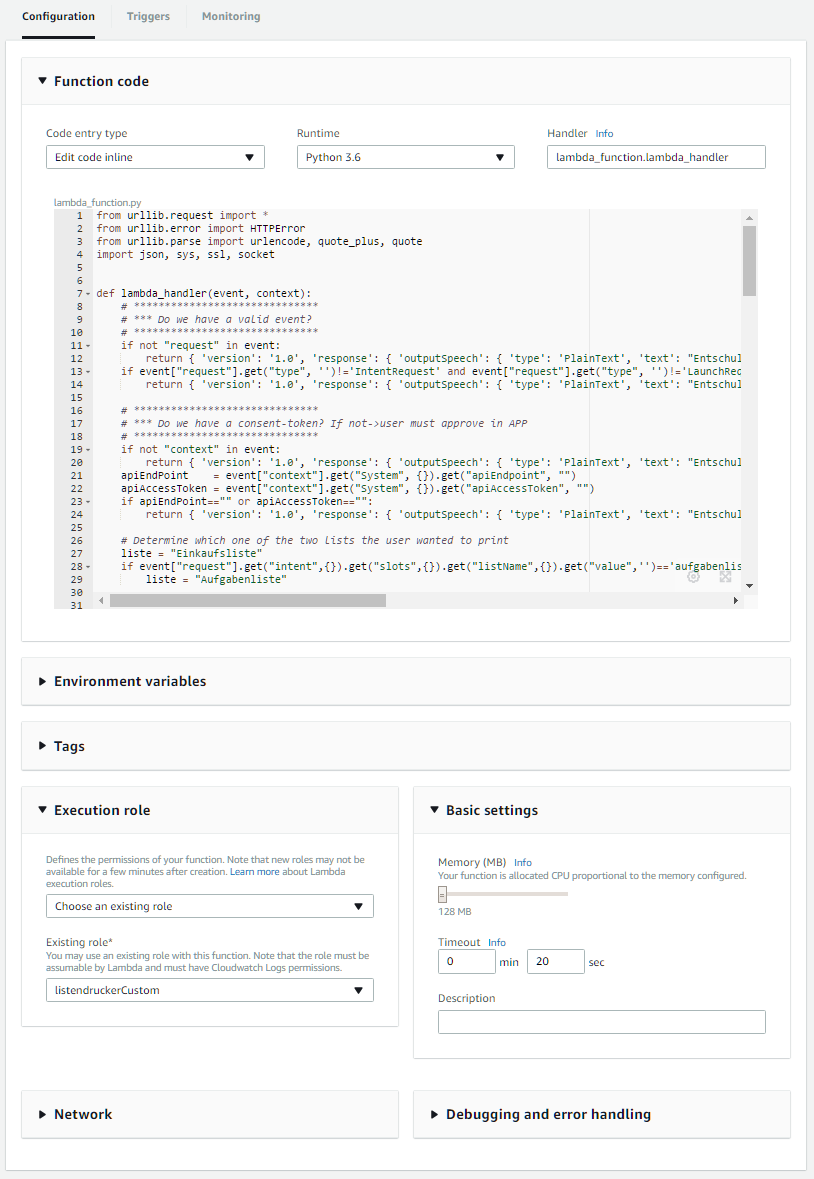 In order to create the lambda function:
- log into your Amazon developer console,
- navigate to AWS,
- find the „Lambda“ button,
- create a new lambda function from scratch named printer-glue-code with lambda_basic_execution role running on python 3.6; it can remain named lambda_function.lambda_handler .
- Then, paste the code from above and save the function.
- Also, you should set the timeout to 20 seconds under „Basic Settings“.
Now, add ALEXA as allowed calling source:
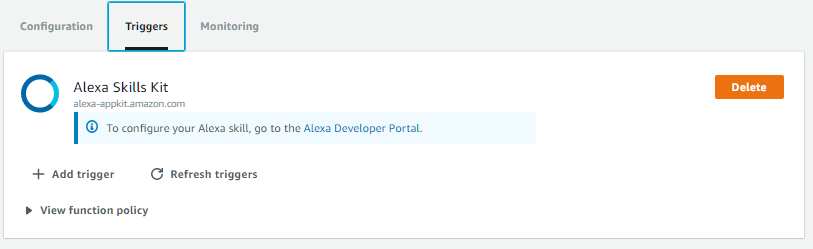
- Switch to the tab „Triggers“ (current one is called „configuration“) and press „Add Trigger“
- In the grey box, select „ALEXA Skills Kit“ and press „Submit“
- Never mind the error, just close the box by pressing „cancel“.
- Upon refreshing the triggers, you should see the ALEXA Skills Kit trigger
Lastly, take note of the ARN in the upper right corner:

You can press the „Test“ button and use the default event. It should come up with a green success message.
5 Kommentare zu “Amazon ALEXA Lists Exercise – Put’em on Paper…”
Hi,
great post.
Could please tell which thermal printer you have used?
The amazon link isnt‘ working anymore.
Thanks
hi, Thanks. The one I used isn’t available on Amazon anymore, but any USB receipt printer should work… Just look for what mike24’s ESC/POS library is supporting and buy one of those models… Best, Christoph
Thanks for the reply. This product list on github helps a lot.
One further question: Could you really delete the original shopping list with the skill? In your video you use the original „Einkaufsliste“ so you could also delete this one per API? In your code for the lambda it is „shopping list“ and not the original code snipped?
Danke und Gruß
Tom
hi, well, the Einkaufsliste is used by the ALEXA language model. it translates into „shopping list“ in the skill. Therefore the difference… Cheers.
Hello!
Nice work ! I try to integrate it to home assistant .
Your video link is dead could you update it please?
regards
Ben
Einen Kommentar hinterlassen